

Findmy iPad Pencil Compatible with Apple iPad 2018-2025,Tilt Sensitivity,Palm Rejection, Fast Charge Stylus Pen for iPad A16(11th)/10/9/8 & Air 13/11 & Pro 12.9/13/11 & Mini 7/6/5 No Wireless Charging
$22.79
Related Products





Product description


1 Smooth and Precise
2 Palm Rejection


1 Painting
2 Notes
3 Working
What should you do if the Find My iPad Pencil doesn’t pair with your iPad?
1. If your iPad has paired with an original Apple Pencil, our Find My iPad Pencil may fail to connect. Please remove the original Pencil from your iPad’s Bluetooth settings first
2. please ensure your iPad model is compatible with the Find My Pencil
What should you do if your Find My Pencil won’t turn on?
If the Pencil won’t turn on, try charging it with a Type-C cable for 25 minutes. Once fully charged, test the Pencil again.
What should I do if I see the “Find My unavailable” alert on my iPad?
If this alert appears, please check the following:
1. Ensure Bluetooth is turned on for your iPad.
2. Confirm your iPad is connected to a stable Wi-Fi or cellular network.
3. Verify that your iPad is signed in to your Apple ID.
What should I do if my Find My Pencil won’t connect to Bluetooth?
Follow these steps to connect via Bluetooth:
1. Press and hold the button on the back of the Pencil for 2 seconds to activate pairing mode.
2. Go to iPad Settings > Bluetooth and select Otouch Pencil to pair.
Does this Pencil support magnetic pairing and charging?
1. This Pencil supports magnetic attachment with the all ipad models 2018 and later (NOTE: it does not support wireless charging).
2. The Pencil cannot be charged magnetically and must be charged via USB-C.
【Easy to Find】Apple Find My function allows you to locate your iPad Pencil anytime and anywhere, whether you’ve misplaced it while out or at home. You can use the Find My app to make your pencil play a sound when it’s nearby but out of sight
【2X Fast Charging】Connect a Type C charger for the Apple iPad Pencil to be fully charged within 18 minutes to save time and get up to 16 hours of usage time. ⚠️Note: do not support Wireless charging
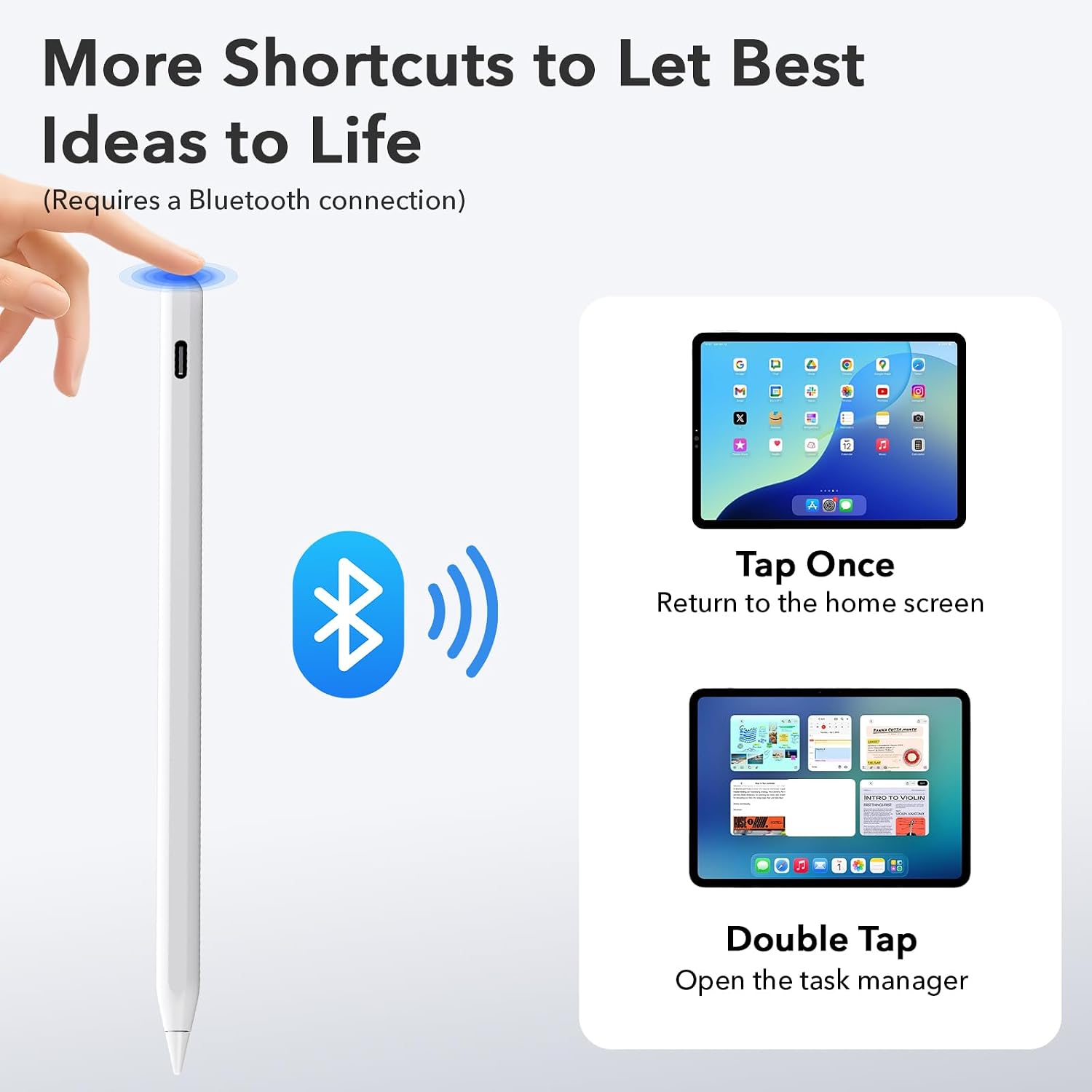
【Easy Shortcuts】When connected to Bluetooth, tap to return to the main interface, double-tap to access the task manager, and view real-time battery level display on your Apple iPad. The LED indicator displays different colors based on battery level, reminding you to charge in time. It will automatically turn off after 5 minutes of inactivity for better energy efficiency
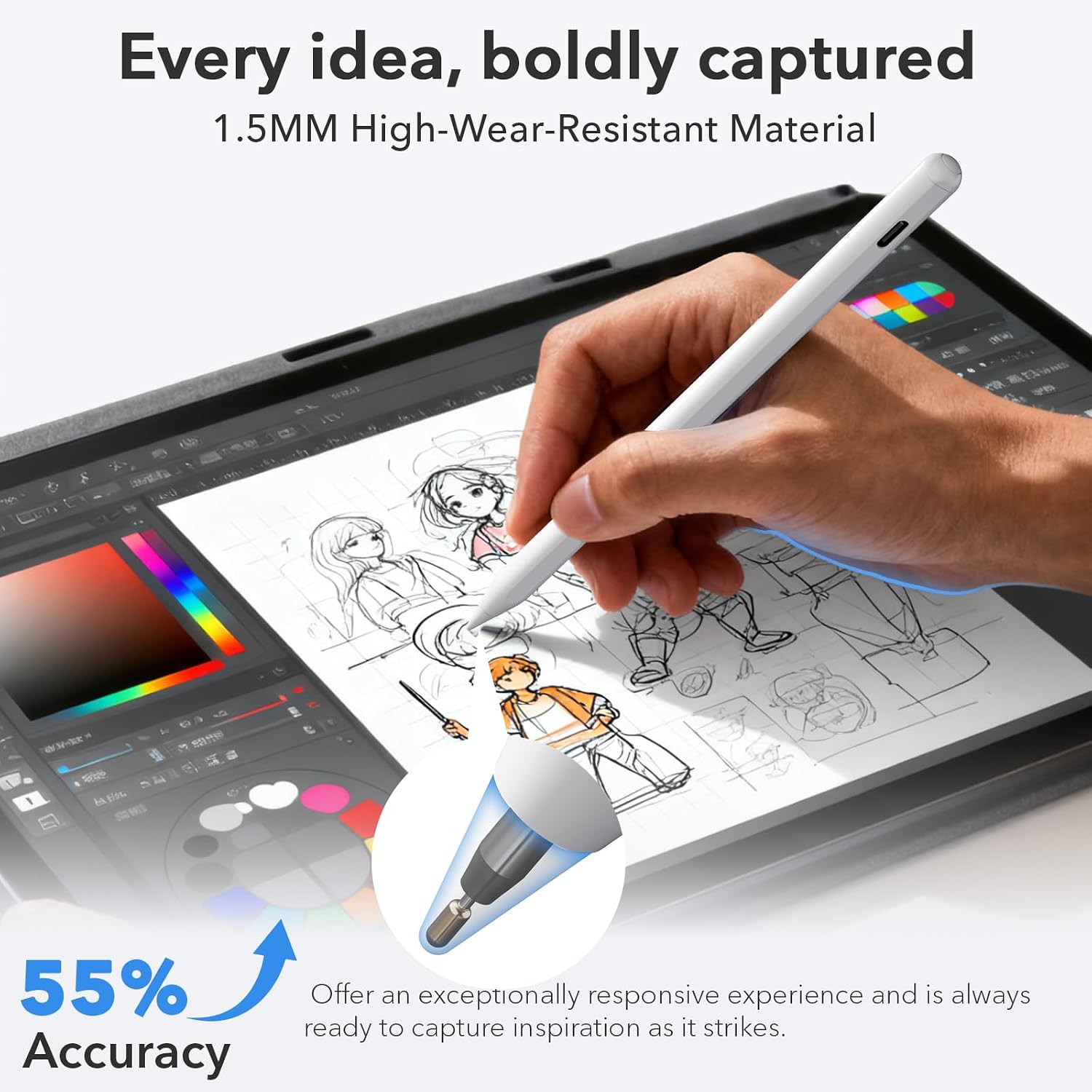
【Tilt Sensitivity】Built-in sensor allows you to adjust the thickness of your lines by tilting the nib, enabling realistic shading, detailed drawings, and writing just like on paper.NOTE: Support handwriting and shape recognition when you turn scribble function on in your Apple ipad
【Designed with Palm Rejection】This stylus pen offers a natural paper-like feel and effortless screen interaction. It provides enhanced accuracy and control for every stroke. For the best performance
【Precise and Smooth】Experience writing and drawing as natural as pen on paper. Our stylus combines a 1.5mm POM tip for a fine, durable point with a high-speed chip that delivers instant response. The result is glide-smooth performance with zero lag, perfect for notes, art, and precision work
【Secure Magnetic Attachment】Keep your iPad Pencil handy and secure by magnetically attaching it to your tablet for easy storage on the go; NOTE: only supports magnetic attachment with Apple iPads that support Pencil magnetic attachment
6 reviews for Findmy iPad Pencil Compatible with Apple iPad 2018-2025,Tilt Sensitivity,Palm Rejection, Fast Charge Stylus Pen for iPad A16(11th)/10/9/8 & Air 13/11 & Pro 12.9/13/11 & Mini 7/6/5 No Wireless Charging
Add a review
$22.79
Shivers –
This is an awesome weapon! Choose your next pen wisely! ❤️
Are you kidding me?? This is a champ!Comes with USB C charge cable, 3 extra pencil tips, nice case… I like this pen! Super simple to use! Can’t really complain about that!Turn on your Bluetooth, turn on the pen… and you are done! It connected being around 6 other iPads in the same account. No issues.Open anything! It just works! Just like the real deal Apple pen!For the price of the little awesome pen, it’s a no brainer!Also has the magnetic strip so it will lock onto your iPad easy!Not much more to say about this little winder. You can copy like Ipen, paste like ipen… move into sentence like an ipen… you get the drift! It’s a pencil. It works great! Will be using for my up an coming race settings! Super great to add notes on the fly with your iPad!Photos to come!Shivers, would you spend your money an buy this pen? Ha… yes! I 100%. This is a sweet little unit. Works great with “find my” as well.It’s white, sort of wish it was black. Oh… and the USB C rubber cover, I do wish they sent an extra one of those.Will report back on battery life and add some photos! Don’t worry. More coming.Value for your money? Absolutely! Easy connectivity?? 1000% The feel in your hands? Between your fingers? Great! Not to big, not to annoying. Just right.Will need to test with Android. But compatibility with my 6th gen and 8th gen iPads. Yes.Yes photos and video coming.
Serena-Rena-Bo-Beena–Bana-Fana-Fo-Feena–Fe-Fi-Mo-Meena–Serena! –
The best stylus hands down
I recently purchased an off-brand stylus that’s compatible with Apple devices, and I have to say, it’s amazing! It even has a “Find My Phone” feature, which is super handy. The stylus works beautifully, responding accurately even when tilted on the screen. The palm rejection feature is fantastic for drawing, allowing me to rest my hand on the iPad without any interference.This stylus connects via Bluetooth and includes a shortcut function, which adds convenience while using it. I love the real-time power display and the fact that it’s magnetic, so I can stick it to the side of my device and not worry about losing it. Honestly, this little $20 stylus performs better than my Apple Pencil, which cost over five times more!I’ve been using it with the Procreate app for drawing, and the pressure sensitivity is excellent. It’s perfect not just for writing but also for creating art and even for scrolling through apps or playing games. The battery life seems impressive, and the USB-C charging port is a huge upgrade compared to my Apple Pencil’s old-style charging plug, which I always found inconvenient.Another feature I appreciate is the button at the top, which allows me to power it on and off as needed, helping save battery life. My old stylus didn’t have this, so having that control is a game changer.Overall, this stylus is lightweight, well-constructed, and ergonomically designed with a flat side for thumb orientation. I absolutely love how it feels in my hand and the range of features it offers. This has been an excellent value for the price I paid, and I couldn’t be happier with my purchase! Highly recommend it!
Eric –
offers excellent value, thoughtful features
I have been very pleased with my experience using the iPad Pencil. From daily note-taking to light sketching, it has been reliable, comfortable, and easy to use. The Apple Find My feature is especially helpful, as it gives real peace of mind knowing I can quickly locate the pencil if it is misplaced.The fast Type-C charging is another strong advantage. A short charge provides long usage time, which fits well into a busy schedule. I also appreciate the easy shortcut functions, as they make switching between tasks smoother and more efficient.The tilt sensitivity feels natural and responsive, making writing and shading feel close to pen on paper. The magnetic attachment keeps the pencil secure and always within reach.
Jim –
Smooth writing feel
I take notes and sketch on my iPad often, and the budget pens I used before had random disconnects or limited features. This pencil has been steady so far, and the grip feels comfortable during long writing or drawing sessions. Its simple white body looks clean next to the iPad. After pairing with Bluetooth, tapping the tip takes me back to the home screen, and the double tap opens the task switcher, which cuts down on manual steps when I move between apps. The iPad shows the battery level, so I do not run into surprise shutdowns during work. The tilt sensor responds well, and drawing thicker or thinner strokes by changing the angle feels natural when I shade or outline. In note taking apps, handwriting and shapes adjust neatly, and I have not run into lag or dropped lines. For writing, class notes, or light design work, it covers my daily needs without trouble.
Brittany Gargiulo –
White stylus for everyday writing
Matte ridge turns slightly as I guide the pen toward app icons, soft plastic grain touching my finger while I check how close it sits to the screen edge. shortcut zone meets my thumb, maybe higher than I hold naturally, but I adjust again and taps register once I find its spot. slim connector positions near the port before I slide it in, tablet indicator flicks on so I check that corner to confirm. extra nib twists lightly in my hand when I align it for a try, small unevenness but it secures with a turn. magnetic strip finds the case first instead of the frame, so I nudge it upward and let it stay there. almost forgot I switched palm rejection earlier, and lines follow lists without drifting. it waits near the notebook after I finish a section, tip angled toward whatever I need next.
MsCayn –
Won’t pair
Doesn’t pair with my Ipad pro M5