

KIHENG USB C to AR Glasses and Charging Adapter, Charge and Play, Compatible 100W PD Fast Charging for iPhone 17-15, Switch OLED, Steam Deck Connected Viture/Rokid/Xreal AR Glasses 1080P 120Hz/4K 60Hz
$22.99
Related Products




Product description


Question: Is it compatible with Switch 2?
Answer: The software for this AR HUB is not compatible with the Switch 2, we will be releasing a version that is also compatible with the Switch 2 in the future and will update the item title and bullet points when that happens.

Question: How many W PD power supply is supported?
Answer: The chip supports up to 100W fast charging. To ensure long time compatibility and stability, it is recommended to use a 65W fast charger. It’s compatibility not enhancement, you need to have a charger with the corresponding charging power and your device should be able to support the corresponding charging power. But Switch/ROG/Steam Deck‘s internal hardware will trigger a protection mechanism to limit the charging power if it is too high. Therefore, please use the original charger to connect to our HUB (Switch /OLED: 15W, ROG: 65W, Steam Deck: 45W)

Question: Is it available for iPhones?
Answer: It’s a Type C connector that won’t work on all iPhones, so, it currently applies to the iPhone 15/16/17. And it also only works with iPads that have Type C charging ports.

Question: Why does my portable monitor work intermittently or lose video output entirely when the HUB is connected to the charger?
Answer: Due to the high power consumption of portable displays, our hub’s power output cannot simultaneously provide high-power electricity while charging. Therefore, you need to use a power cord to supply additional power to the portable display to resolve this issue.
Q&A. 1
Q&A. 2
Q&A. 3
Q&A. 4
Add to Cart
Add to Cart
Add to Cart
Add to Cart
Customer Reviews
4.2 out of 5 stars 129
3.7 out of 5 stars 46
4.5 out of 5 stars 53
3.9 out of 5 stars 28
Price
$22.99$22.99 $17.95$17.95 $23.69$23.69 $29.89$29.89
Conversion Plan
USB C to USB C USB C to USB C HDMI to USB C USB C to USB C
Function
Video and Charging Video and Charging Only Video Video and Charging
Compatible with Nintendo Switch 2
No No Yes Yes
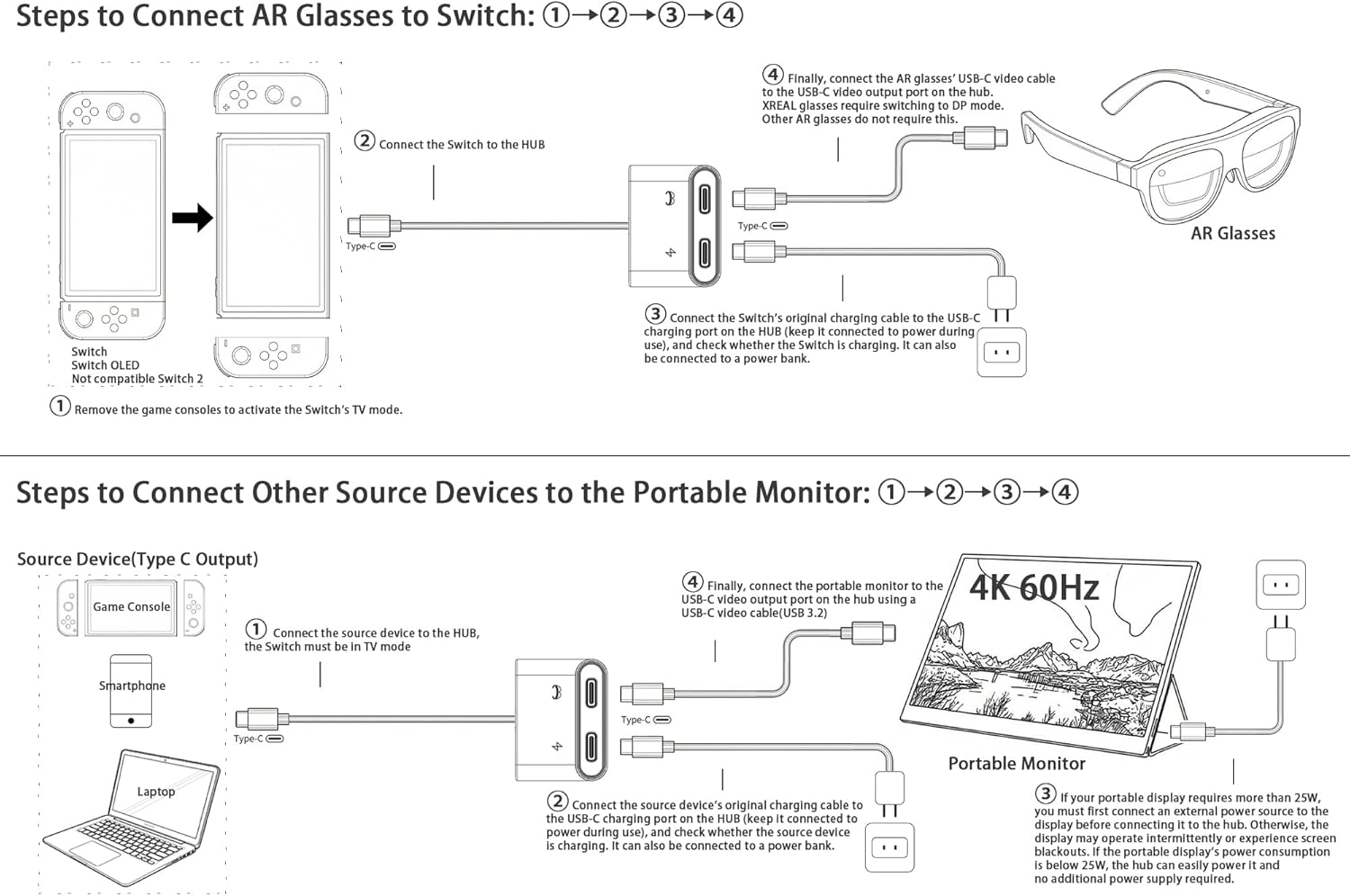
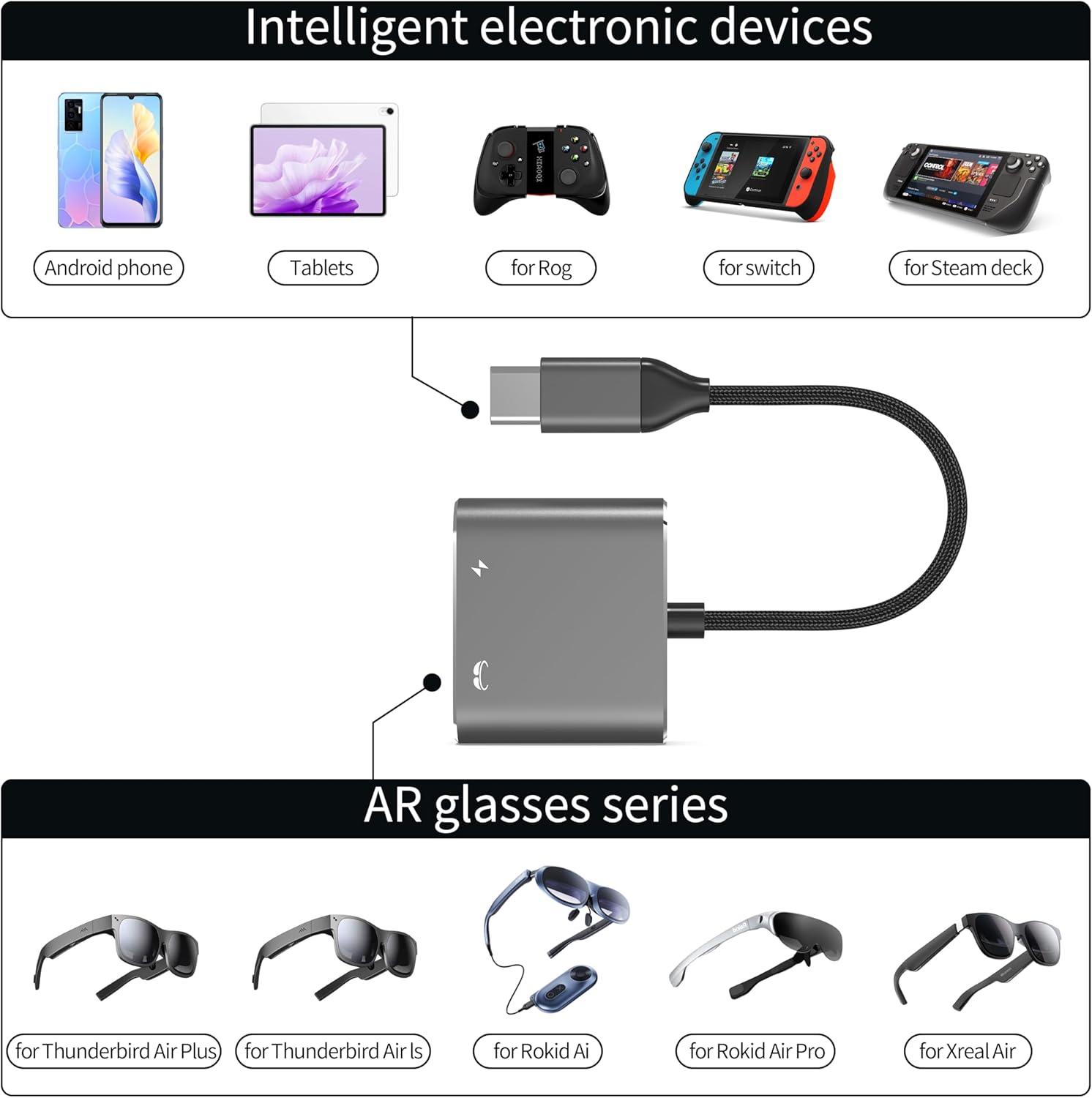
Use While Charging: The USB-C to AR Glasses Adapter is a must-have accessory that allows you to connect your device to your AR Glasses and charge up at the same time. And Switch /Switch OLED/Steam Deck/Rog Ally/smartphone can be charged, you can always enjoy the joy that AR glasses bring you, very convenient design. 𝐓𝐡𝐢𝐬 𝐡𝐮𝐛 𝐢𝐬 𝐧𝐨𝐭 𝐜𝐨𝐦𝐩𝐚𝐭𝐢𝐛𝐥𝐞 𝐰𝐢𝐭𝐡 𝐭𝐡𝐞 𝐍𝐢𝐧𝐭𝐞𝐧𝐝𝐨 𝐒𝐰𝐢𝐭𝐜𝐡 𝟐, 𝐏𝐒𝟒/𝐏𝐒𝟓, 𝐗𝐛𝐨𝐱.
Video And Charging 2-in-1: This charging port is compatible(Note: It’s compatibility not enhancement, you need to have a charger with the corresponding charging power) with 65W/100W USB-C fast charger that used in this hub allows the phone and gaming hendhleds to charge quickly. Newly upgraded customized chip with stable video transmission and better compatibility(Note: It’s compatibility not enhancement, your device needs to have such high performance), compatible 4K 60Hz/1080P 120Hz for Switch/Switch OLED, Smart Phone, Steam Deck. Also suitable for Rokid, Xreal,Viture series AR glasses, etc.
DP Protocol Video Output: Xreal AR glasses connect correct to the HUB but there is no sound or not video on glasses, you need to switch the Xreal AR glasses to DP Mode(𝐃𝐢𝐬𝐩𝐥𝐚𝐲𝐏𝐨𝐫𝐭 𝐀𝐥𝐭 𝐌𝐨𝐝𝐞) according to the AR glasses manual. Except for Xreal AR glasses, which require switching to glasses mode, AR glasses from other brands do not require this.
Compatible with USB-C Portable Monitors: When the portable display’s power consumption is below 25W, the hub can easily power it. If your portable display requires more than 25W, you must first connect an external power source to the display before connecting it to the hub. Otherwise, the display may operate intermittently or experience screen blackouts. Please note the power consumption of the monitor.
Mini HUB: The size of the hub is only the size of the palm of your hand, which makes it easy to carry, and the shells are all made of aluminum alloy material, which dissipates heat very well and safely when in use.
Adapter Type-C: If your device only supports HDMI but not Type-C, please choose HDMI to USB-C hub. This is very important, because of PS4/PS5, Xbox cannot use this USB-C to USB-C hub. Of course, we also sell HDMI to USB-C hub, search 𝐀𝐒𝐈𝐍 B0DSZXZSTX (𝐜𝐨𝐦𝐩𝐚𝐭𝐢𝐛𝐥𝐞 𝐰𝐢𝐭𝐡 𝐍𝐢𝐧𝐭𝐞𝐧𝐝𝐨 𝐒𝐰𝐢𝐭𝐜𝐡 𝟐, 𝐏𝐒𝟒/𝐏𝐒𝟓, 𝐗𝐛𝐨𝐱) on Amazon. However, do not use these two HUBs together at the same time.
Friendly Service: The interface of the HUB is designed to be compact, this is to prevent the interface from shaking during use. If you have any questions, please leave a message through the manual or Amozon seller KIHENG. We will actively help you to solve the problem.
8 reviews for KIHENG USB C to AR Glasses and Charging Adapter, Charge and Play, Compatible 100W PD Fast Charging for iPhone 17-15, Switch OLED, Steam Deck Connected Viture/Rokid/Xreal AR Glasses 1080P 120Hz/4K 60Hz
Add a review
$22.99
G-Man –
Simple, practical solution that just works
This is a very handy little gadget. I use it so I can run my RayNeo Air 3s XR glasses while charging my Asus ROG Ally at the same time. It would be nice if the Ally had more than one USB-C/USB 3 port, but since it doesn’t, this is the solution.It simply works. No setup hassles, no glitches, no fiddling. Plug it in and get back to what you were doing.It’s also noticeably cheaper and less bulky than the solutions Asus offers for the same problem, which makes it an easy recommendation if you’re using external displays or XR glasses with the ROG Ally.
ManiacMagic –
Viture Luma Pro + Android
Small size and offers full fast charging (the viture adapter seemed limited). Sound and video work without issue while also having my S24 Ultra charge.I only use this on my phone for now.
JD –
Works great with XREAL One Pro and Pixel 9
Update on 13 August.—the support was great. I must have had an older usb hub that didn’t work well. The company sent a new hub and it worked without issue.i was unable to use the item until my XR glasses showed up, so I was outside of the return window. The glasses (XREAL One Pros) work when connected directly to a device. The adapter does not work when connected. It also does not provide power to the device as a PD through. Either the adapter i have is defective or its incompatible with the Xreal one pros and pixel devices.
KW Rock –
It works,
It’s a well made product but won’t work with Android. I does though work with my Lenovo and HP lap and desktop. Getting used to typing on the key pad but viewing the screen via AR glasses.Price is high but totally competitive with comparable units
Kingmo suleiman –
Good buy
Good for AR glasses perfect
Tony G –
had high hopes but very dissapointed
Got this for a trip in Sept. , tested it when I first got it and it rked really good. Used it on the trip this last two weeks and it caused visual issues for my ray neo and the sound kept playing on the phone instead of just on the glasses. had high hopes but very dissapointed
Big D. –
Works, but not as well as expected
The item does what it advertises in the sense that you can use the XReal Airs while charging, but the Xreal airs are no longer recognized properly on Steamdeck and plugins that implement 3DOF on the Steamdeck no longer work while using this.Also, weirdly, the sound output of the Airs when using this adapter does work BUT is significantly reduced, even at maximum volume so I can barely hear anything when using the Airs with these so, unfortunately, doesn’t work as seamlessly as I expected. This sound problem wouldn’t be as much of an issue for someone that uses mainly headphones, but if you want to use the sound output from the glasses itself, it’s very faint for some reason, even when trying to switch to DP mode as listed on the instructions didn’t fix this.
Jung –
Worked with RayNeo and easily fit in the case.
I use a pair of RayNeo Air 3s XR Glasses with a Samsung Flip6. I have a 4-port hub that I have used to charge my phone and connect with the glasses, but it is inconvenient to carry around.I purchased this hub as a less expensive alternative to the hub sold by RayNeo. The hub worked out of the box. I connected a power bank and confirmed my phone was being charged. The glasses worked when connected and I could see my phone’s display.The hub is small enough to fit in the pocket of the RayNeo carrying case, as seen in the picture.