

TONOR USB Conference Microphone for Laptop, Adjustable Computer PC Mic with Mute Button & LED Indicator for Video Call Meeting, Microfono for Desktop Zoom Skype YouTube, Plug-Play for MacOS Windows
$29.99
Related Products





Product description
The video showcases the product in use.The video guides you through product setup.The video compares multiple products.The video shows the product being unpacked. hero-video Merchant Video

 Plug and Play
No drivers required, with two types of connectors, compatible with multiple devices.
 Mute & Reduce Noise
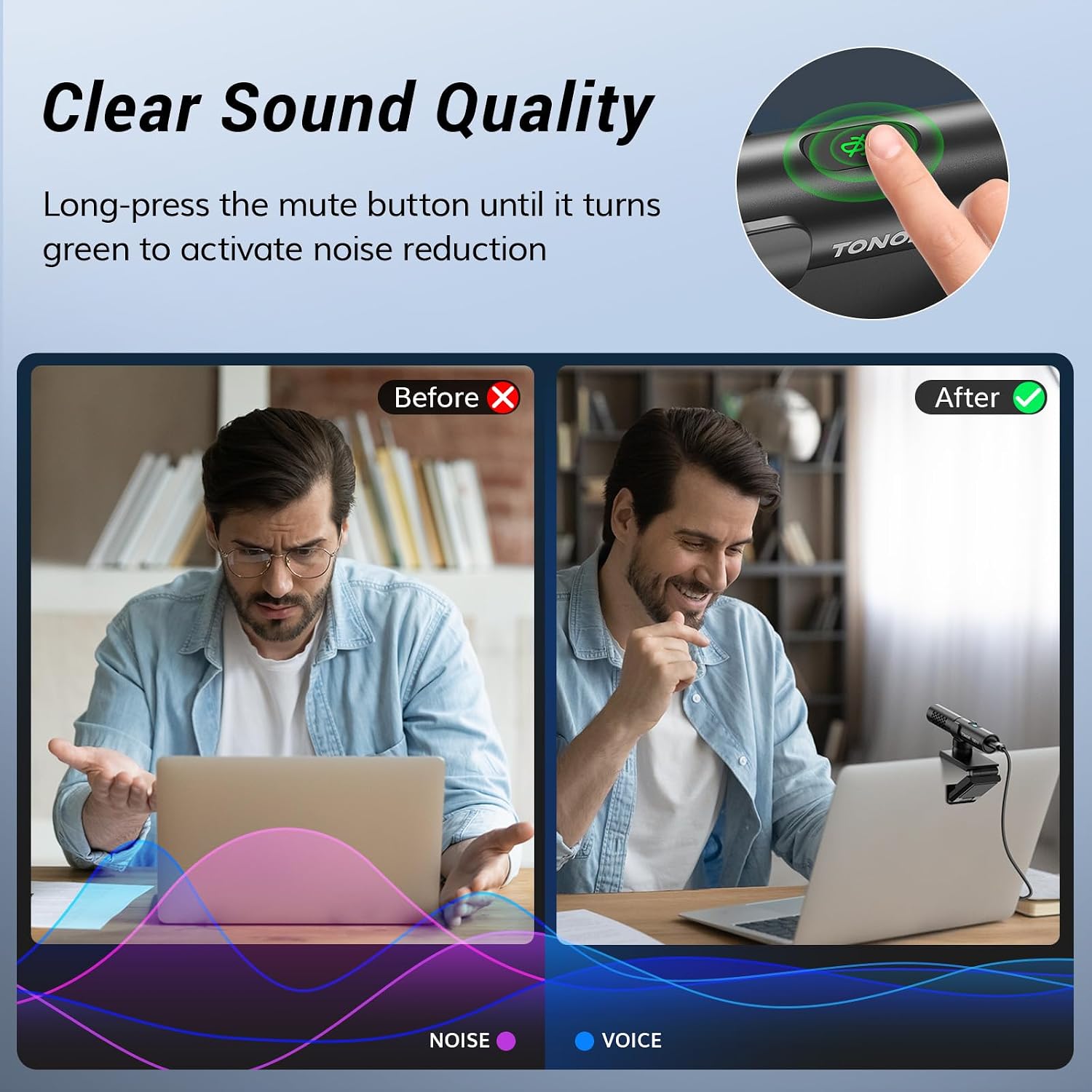
One-click mute/noise reduction function with LED indicator displaying microphone status.
 Portable Kit
Weighing only 33g/0.07lbs, it is perfect for on-the-go office use.
1 Plug and Play
2 Mute & Reduce Noise
3 Portable Kit
 What’s in the box
1 × USB Shotgun Condenser Mic, 1 × Bendable mic stand, 1 × Type C-Type C cable, 1 × Dongle, 1 × Manual
 Clamp Structure
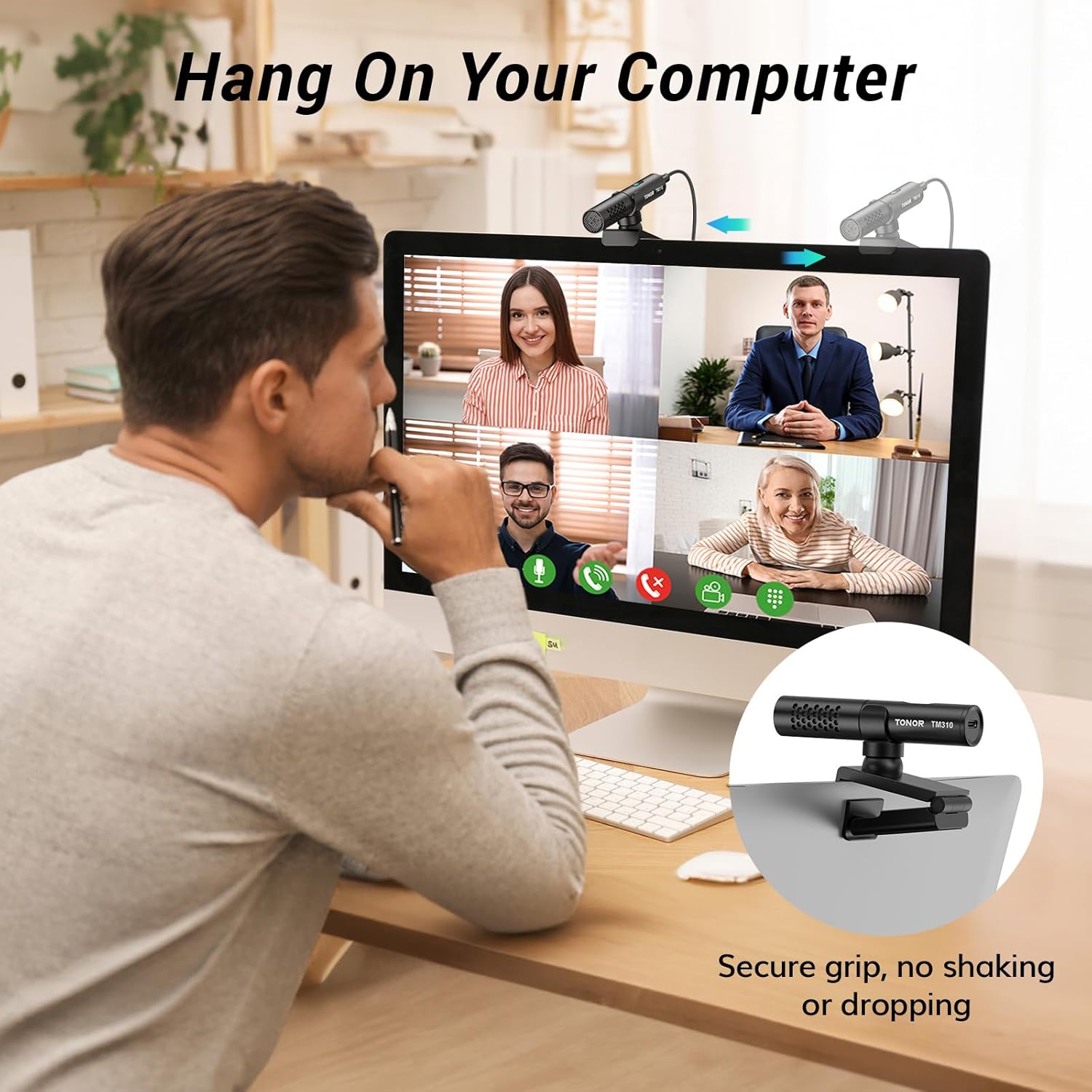
Preset damping ensures stability at adjustable angles, with an anti-slip surface protecting the screen from scratches.


1 Home Office 2 Business Travel 3 Gaming
Is it compatible with the Mac OS operating system?
Compatible with Windows (7, 8, 10, and 11) and macOS. Comes with a Type C to USB A adapter for plug and play functionality. Not recommended for use with smartphones.
Can the shotgun condenser mic completely isolate the noise from the mouse and keyboard?
The shotgun condenser microphone features a heart-shaped pickup pattern that focuses primarily on the front, effectively reducing noise from mice and keyboards. However, it does not isolate all sounds.
Is the microphone clamp securely stable?
The microphone clamp has a unique clamping structure with preset dampening for stability at any angle. Made of material, it can withstand repeated adjustments and provides a reliable grip.
What material is the microphone made of?
The microphone is made of high-quality metal, lightweight (33g/0.07lbs). Ideal for video conferences, game streaming, business trips, and chatting in various scenarios.
Is it possible to adjust the volume?
The microphone volume can be adjusted through the computer, and it features a one-click mute/unmute button. There is also a built-in LED indicator to indicate its working status at any time.
Microphone for PC
Add to Cart
Add to Cart
Add to Cart
Add to Cart
Customer Reviews
4.3 out of 5 stars 435
4.4 out of 5 stars 1,953
4.4 out of 5 stars 4,083
4.4 out of 5 stars 58,613
Price
$29.99$29.99
$35.99$35.99
$29.99$29.99
$31.99$31.99
Power Source
Supercardioid
Omnidirectional
Omnidirectional
Cardioid
Connectivity Tech
80Hz-20kHz
20Hz-20kHz
50Hz-16kHz
50Hz-20kHz
Sensitivity
-36dB±3dB
-38dB±3dB
-38dB±3dB
-38dB±3dB
Plug&Play
USB A & Type C
USB A
USB A
USB A & Type C
Mute Button
✓
✓
✓
✓
Smart LED Indicator
✓
✓
✓
—
Pick-up Pattern
✓
✓
✓
—
Natural Audio Clarity: The TONOR TM310 microphone features a supercardioid directional pickup design, optimizing its front sound capture capability. Powered by a high-quality dynamic core, it greatly reduces pickup from the back and sides, effectively minimizing noise interference during use. Upgrade your audio experience and enjoy a clearer sound
Unique Clip-on Structure: Securely attaches the microphone above the computer, ensuring stability at any clamping angle. The clip-on structure can hold onto any computer or monitor, minimizing desk space. Additionally, the soft material covering the clip protects the screen and desk from scratches
Wide Compatibility: Includes Type C to Type C USB cable and a Type C to USB A adapter, making it compatible with all computers. It’s a plug and play device that doesn’t require any drivers. Works seamlessly with Windows (7, 8, 10, and 11), macOS and PS4/5, not recommended for use with smartphones
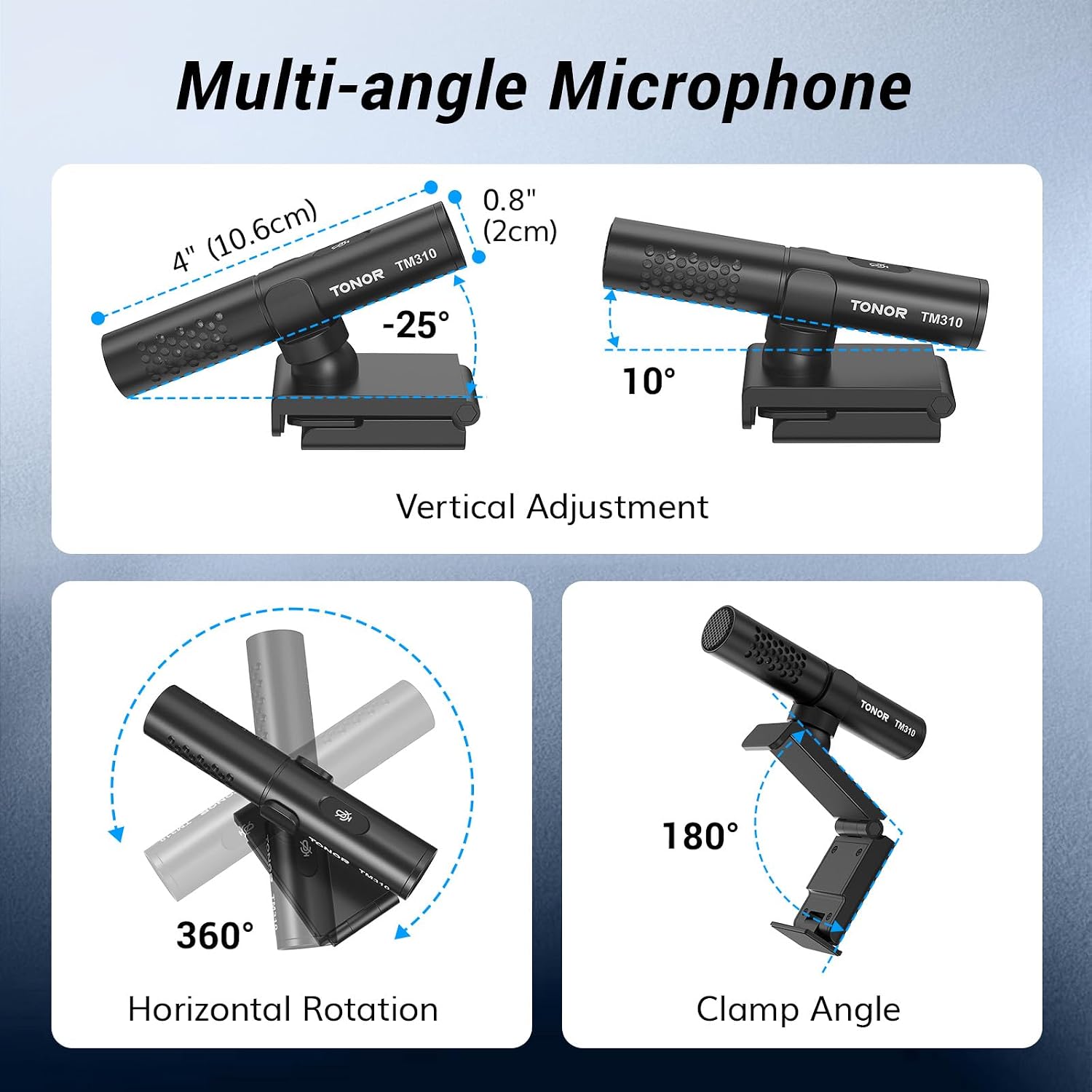
Adjustable Angle: With its adjustable rotational joint, this usb microphone offers 360-degree horizontal rotation and -25°to 10°vertical adjustment. This ensures optimal performance and sound capture, fulfilling your specific needs
Mute & Reduce Noise Button: Microphone for pc features a single button with an LED indicator that combines mute and noise reduction functions. Tapping the button and seeing a red light indicates the microphone is muted. Tapping it again and seeing a blue light indicates the microphone is unmuted. Long-pressing the button activates the noise reduction feature, indicated by a green light
13 reviews for TONOR USB Conference Microphone for Laptop, Adjustable Computer PC Mic with Mute Button & LED Indicator for Video Call Meeting, Microfono for Desktop Zoom Skype YouTube, Plug-Play for MacOS Windows
Add a review
$29.99
Gadgethound –
Surprisingly good, esp for the price! Semi-hidden ANC function is a nice bonus
Purchased this for a simple solution to improve Zoom calls, vs using web cam or laptop mics. The mount is typical clip on like a webcam, but with a small gimbal to adjust direction and of the mic. It’s simple a simple USB-C connection, and comes with a USB-A adapter if needed.Plug and play. No software or drivers needed. Works automatically with Zoom, Google Meet, Voice Memos, or pretty much anything I’ve tried with it. No problems on Macs, including latest M-series chips.Sound wise, it’s super clear and a clear step up from built in mics. Because of the pickup pattern, noise to the sides and back are great reduced. The mic is def tuned for voice and video conferencing in particular.The mic construction seems very solid (metal housing) and the mute button provides a convenient LED to indicate when the mic is muted. The mic mute does not sync with the Zoom UI though, so you the LED is handy. It’s compact and can be tossed in a bag without worry.There is a semi-hidden active noise cancellation function. Press and hold the mute to enable/disable it (led alternates between blue and green). This might help in particularly noisy environments, like a coffee shop or open office, and is an unexpected bonus, even if you have it disabled.
William CHEN –
Clear Sound and Easy to Use!
The TONOR USB conference microphone is perfect for my PC. It was truly plug-and-play with no setup needed, and the sound quality is clear and reliable. The mute button with LED indicator is very handy during Zoom and Skype calls, and the adjustable design makes it easy to position just right. For video calls and online meetings, this mic delivers excellent performance at a great price.
BarryG –
Good audio quality, sensitive to vibration
The microphone mounts well to the top of my desktop monitor. The audio output is a bit low so you need to turn up the level in the computer. The sound quality is quite good. Be aware that the microphone will pick up slight vibrations in the desktop area and they come out as low pitched noise in the audio output. This happened to me with the mic mounted on my monitor or sitting on the desktop. So you might need to work out some mounting isolation. I plan on experimenting with a shock mount.
Amazon Customer –
Excellent Microphone, Not the Best Noise Cancelling Though
I recently purchased the EMEET SmartCam S600 Camera, and unfortunately, it has been a huge disappointment, particularly because the built-in microphone is essentially garbage. The camera itself is subpar, but the real dealbreaker is the microphone, which barely works. The audio quality is so poor that it renders the camera almost unusable for any serious communication.To remedy this issue, I decided to buy the TONOR USB Conference Microphone, and the difference is night and day. The new mic is fantastic—clear, crisp, and reliable. While the noise-cancelling feature isn’t amazing since it doesn’t use advanced algorithms, it first compresses the audio quality and works by opening the mic when you speak (unfortunately capturing ambient noise) and closing it when you don’t (canceling room noise). I ended up turning off the mic’s noise cancelling and using the built-in noise cancelling in apps like Discord and Zoom, which are much better.
Abhishek Roy –
Good mic for online meetings
Well packed and delivered. I liked the product and the quality is great. I tried another one but in my online meeting people complained about voice, But this one I have not heard any complains so far. I am 80% of the time in meetings and and headphones were becoming a pain. Now i run a combo of JBL speakers and Tonor mic. Works perfect for me.
dw –
Mushy
Not a fan. I had high hopes.The Good:Build quality is nice. Sits right up on my monitor, no problem. It could likely be adapted for lots of different situations. Provided cable is nice and it has USB C with a C-to A adapter included. The touch-sensitive switch for noise reduction and mute works well and is a nice touch, and I never used it once. Plugs into windows, and no driver thrash – it just works without fanfare.The Bad:Only one complaint. It sounds awful. It’s mushy and has no clarity. Doesn’t improve over the stock mic in the camera whatsoever. I had it on top of my monitor about arm’s length-ish away. I tried it with the noise reduction on and off, and although the noise reduction works, it didn’t make a difference in how the mic sounds. The noise reduction is redundant to the noise reduction already in popular meeting apps, and I can’t say that it’s any better. I bought it with the thought that it would make Teams and Zoom calls sound less like a crummy laptop mic, and it doesn’t at all. I also can’t say that it’s particularly directional, which was also a hope. I didn’t expect it to sound like a Neumann, but I did expect it to have a bit more crispness and broader frequency response than it does.
Elliott –
Well made microphone
This is a fantastic microphone and the price is right. Despite it having a ridiculous no-name Chinese sounding brand name, it seems very well made. The mic has a solid weight to it, and the mic and the monitor clip both feel sturdy and well made.The price was about $27 to $30, which made it much more expensive than the really cheap intercom-style mics but also much cheaper than most webcams with a mic built in. I assume the mic has some directionality to the sound it picks up, because of the shotgun design, but I haven’t tested this. In theory it sounds like a useful feature to not pickup background or peripheral noise.I only use this for discord so I’m not terribly concerned with sound quality or anything, but it was a big upgrade from the previous headset mic I was using based on the comments I got.
justwanttotellyou –
Not directional at all
Not directional at all – can pick up sounds from back and sides very well, almost like there is no preference for picking up sound from the front.
Jaime –
A unos 50-60cm la calidad del sonido capturado es muy buena, no captura el sonido ambiental.Lo uso para reuniones online100% recomendable
Chris –
Je suis très satisfait de ce micro Tonor TM310. Le son est clair, équilibré et la qualité de fabrication est excellente pour le prix. Après plusieurs tests, tout fonctionne parfaitement.C’est dommage de voir certains avis négatifs laissés par des utilisateurs qui, à mon avis, manquent de connaissances en informatique ou en configuration audio. De mon côté, rien à redire : ce micro remplit totalement son rôle et offre un résultat impeccable.Je recommande vivement !
Jose JPG –
Pros:Tiene un buen tamaño para acomodarlo donde más convenga;El sonido es bueno en llamadas por MS teams se escucha muy alto; he tenido micros más caros que no logran este efectoEl botón de mute que tiene es muy útil en llamadasYo normalmente escribo mucho en mi trabajo (memos y notas) así que lo uso con la función de dictado de MS Word, y capta muy bien el 95% de las palabras, he tenido micros más caros que no lo hacenCons:Se filtran los sonidos externos, aunque la voz venga de lejos,Por consiguiente, pasa lo mismo cuando en una llamada escribes en el teclado o mueves hojas, por ejemplo,Como en las especificaciones no indica que tenga reducción de ruido, no lo veo como un defecto, pero si es algo que debes considerar si te afecta, el botón de mute ayuda a minimizar este tema si estás en lugares ruidosos como la oficina
Knützel –
Ich behaupte, dass das Mikro mit der Technik für 85% aller NutzerInnen die deutlich bessere Wahl ist und absolut ausreicht.Das Tonor wird auf dem Monitor wie eine Webcam befestigt, es ist ein Kleinkondensator-Richtmikrofon und ist auf einen Abstand von ca. 30-50cm zum Mund ausgelegt. Ja, der Klang ist nicht “HighEnd-Stereo” und ganz so tiieeeeff, aber sehr gut und schläg um längen jede Webcam und jedes verbaute Mikro. Auch klingt das Teil besser, als jedes Bluetooth-Headset. Das Mikro ist als Superniere konstruiert. Zusammen mit der “AMD Audio Noise Supperssion” hört man selbst meine mechanische Tastatur nur mit sehr, sehr viel Mühe. Das Tonor hat auch ab Werk eine intern verbaute Geräuschreduzierung, die ist aber nicht ganz so gut. Meine Stimme wurde von Kollegen als sehr natürlich beschrieben und absolut klar. Auch wenn die Lautsprecher in einer Videokonferenz direkt neben meinem PC stehen und laut sind, gibt es keine Rückkopplung. Dadurch, dass das Teil am Monitor wie eine Webcam befestigt wird, ist der Schreibtisch frei und Schallimpulse der Tischplatte werden auch nicht übertragen.Das bedeutet, eigentlich ist das Teil für alle die keine Podcaster oder Youtuber sind, die bessere Wahl.Zum Thema, große Kondensatormikrofone sind “besser”: Ja, leicht voluminöser, aber nur, wenn das Mikro ca. 5-15cm vom Sprechenden entfernt ist, alles darüber klinkt unspektakulär bis schlecht. Und es gibt mehr Nachteile. Großkondensatormikrofon sind praktisch immer im Bild zu sehen und müssen eigentlich vor einer Tastatur stehen. Beim Sound hab ich im direktem Vergleich ein Marantz Professional Tischmikrofon, das Marantz ist nur minimal besser und nur bei optimalem Sprechabstand. Das ist auch nur im direktem Vergleich mit Audacity hörbar. Das “hoch gelobte” Sennheiser Profile Streaming Set hab ich direkt zum Händler zurückgeschickt, weil bei 30cm Abstand zum Mund der “Cain” so hoch gedreht werden musste (Verstärkung), dass wirklich alles im Raum aufgenommen wurde. Deshalb ist in den meisten Fällen ein Großkondensatormikrofon bei VKs, Zocken, (egal ob Tisch oder am Boomarm) einfach drüber. Wer alleine vorm Rechner sitzt, der braucht sowas in der Regel nicht. Vor allem, wenn man bedenkt, was ein halbwegs vernünftiges USB-Großkondensatormikrofon kostet (>50€) + Mikrofonarm (>50€), wenn das Teil nicht auf dem Tisch stehen soll. Und in sehr vielen Fällen wird das Ergebnis nicht besser sein, als der Klang des Tonor.Für 29 Euro, defintiv eine Empfehlung.
Rob –
works good, good sound, easy to use. Good for online meetings at my computer.